Full Circle
A small journey to host a static website converted from WordPress.
When I was asked for some help about an old school WordPress website, running on a really old VPS at 5€/month for 1 CPU, my first reaction was do I really want to dig into this? Sounds like a trap, right? Maybe not.
After some investigation on the VPS and the WordPress instance, everything was 7 years out of date. Updating was almost impossible and really time-consuming. After three days of trying and failing, the illumination came.
What was their problem? Upgrade the instance and make some small content updates.
The website is dead simple, 4 pages and they almost never updated them, so, in fact, they do not really need WordPress. It was a standard choice, it is easy to set up, but often, you end up with something hard to maintain. Yes, WordPress powers a great part of the web, but it’s hard to love.
So why not convert it to a static website? (this was the illumination)
A few years ago, maybe a few months ago, converting a WordPress website to a static one would have taken much time, at least when you’re not an expert with CSS. But, as this should not be news to you, AI has improved so much lately.
With Claude 4.6 Opus, I tried:
My website is https://mywebsite.fr, this is a wordpress website which is outdated and really difficult to maintain.I only use 4 pages in that website :Homepage : https://mywebsite.frShop information : https://mywebsite.fr/la-boutique/Pricing : https://mywebsite.fr/tarifs/Contact : https://mywebsite.fr/contact/
These are all basic webpages.
Replicate these pages in static html so that I can host it easily.Keep the same design, make it responsive
15 minutes and a few prompts later, I ended up with a clean structure and the whole website was 99% ok and even better as it even made it responsive.
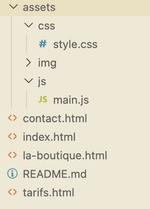
I run some websites, with very small traffic (< 30k / month), on AWS Lambda (with Symfony and bref.sh) and that costs me 4 cents per month (not even sure that I’m billed for that). Server-side rendering is not needed, nonetheless I want something similar, with three criteria:
- Custom domain : we need to keep the https://mywebsite.fr
- Simplicity: I do not wish to spend time maintaining a server for something that small
- Cost: as little as possible — when you know you can pay a few cents, you need to do it
- EU-based: Depending on your context, this should be taken into account. We have great cloud providers in the EU, we should use them!
There are many solutions for static hosting and I don’t want to test everything, many involve CI or some sort of automation, but here, I just want to upload the files. In this case, Object Storage seems to be the right answer.
First try is…
As it was already hosted at OVH, it makes sense. Create a public cloud project, then host files in object storage: should be easy.
Unfortunately, uploading the whole folder does not work, the web uploader can’t process the structure (assets/css, assets/img…), so we have to create them manually. It’s ok for now because the structure is simple and should not evolve, but if you want to use it more often you should go with a CLI tool (s3 api).
A few manipulations later, it works, but hey, in HTTP only. For HTTPS, you have to use a load balancer that costs 6€/month…!
- Simplicity: almost
- Cost: no
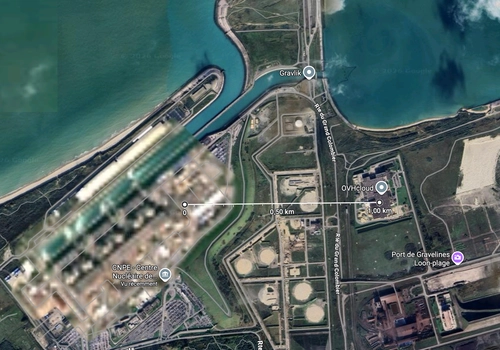
- EU: yes — fun fact: I chose the Gravelines data center which is really close to the nuclear power plant
So I went to Cloudflare, mostly because I’m a bit familiar with its service. It offers two ways for static hosting:
- R2
- Pages
First mandatory step is to make Cloudflare handle your DNS (5 min setup).
Then, for both options, you upload your files and connect the domain you’ve just transferred. Cloudflare automatically adds the appropriate A records to the DNS.
Important note: for R2, it works because it is a fully static website with URLs ending in .html.
If you do that with a static site builder (like Hugo or Astro), it will not work as routing will break.
That’s why Pages is better and also it works natively if you use a static site builder with metrics out of the box.
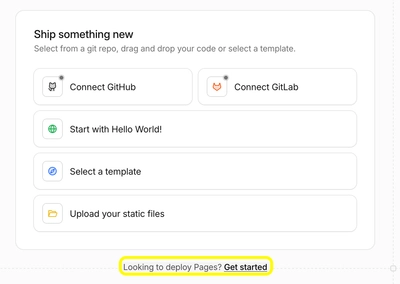
Almost perfect:
- Simplicity: yes
- Cost: yes (free)
- EU: no
Is there any provider that can do the same but in the EU?
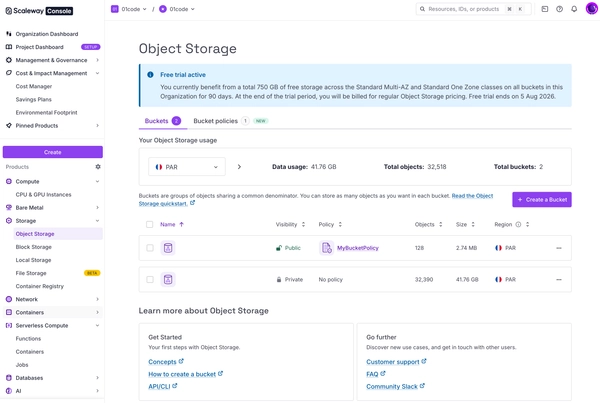
It’s one of the best I’ve seen from a cloud provider.
A voice in my head said: My choice is made, I’m going to host it here, just to have the pleasure of pressing some shiny violet CTA buttons.
The process is pretty much the same as before: create an object storage > upload the whole folder > wait 5 seconds > website is up (with an internal domain name, but still, that was easy).
When setting up the real domain name, a disappointment: no HTTPS available.
The offered solution is to subscribe to their Edge Services for 0.99€/month.
I was expecting a few cents a month; the increase is unacceptable! 😄
I’ve tried it anyway; the website loading was 2 to 3 times faster (from ~300ms to ~100ms).
Important note: it only works with a subdomain, you can’t use it with a root domain (it means you have to handle an HTTP redirect).
It is no longer easy and I still don’t want to pay 1€/month for this website, so — moving on.
- Simplicity: not enough here
- Cost: no
- EU: yes
At that point, I was a bit disappointed; maybe my criteria were too restrictive. I also spent too much time figuring out where to host that website.
Some other solutions I checked:
- AWS Amplify: pricing is a bit blurry (0.01 USD per minute is announced, but you still have to estimate traffic served…)
- GitHub Pages: you have to pay $4 if you want a custom subdomain
- GitLab Pages: free, but you have to build the static website (when I tried it, I encountered some issues at the start, so I moved on)
When I was buying the domain for this blog at OVH, there was some information in the checkout that OVH offers a free hosting plan with it.
The size is ultra-limited though, only 100MB, but for my previous case it was enough.
So I activated it. The deployment process involves FTP — time to bring back fileeeeeeeeeeeezilla!
OVH automatically takes care of DNS setup, neat.
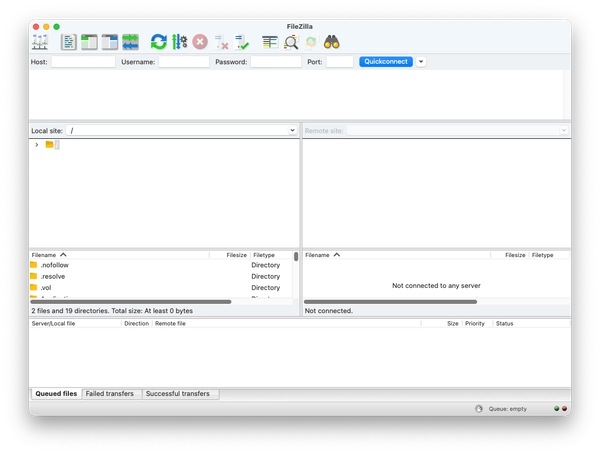
Fun fact: The last time I saw Filezilla used for a deployment was 15 years ago — a developer was moving files from one folder to another and another guy bumped into his chair, making him move the infamous folder to the wrong place without knowing where. The website was down for 15 min.
It’s old tech, but in that case, it works perfectly fine.
- Simplicity: yes (almost too much!)
- Cost: free
- EU: yes
Let’s compare performance — which is the fastest service among the three?
- Cloudflare — with Pages
- OVH — free web hosting in Gravelines (North of France)
- Scaleway — Object Storage (Paris region) with edge services + caching activated I’ve used https://www.openstatus.dev/play to test it.
The results are really interesting (in ms):
| Cloudflare | OVH | Scaleway | |
|---|---|---|---|
| Paris | 39 | 36 | 4 |
| Amsterdam | 52 | 151 | 174 |
| Stockholm | 41 | 117 | 99 |
| San Francisco | 42 | 442 | 418 |
| Singapore | 33 | 463 | 493 |
| Tokyo | 32 | 698 | 656 |
Here you see the power of Cloudflare, stable everywhere. In fact, when you deploy there is a “Welcome to region Earth”, that’s not a lie.
The incredible 4ms from Paris/Scaleway is because openstatus.dev uses Koyeb’s infrastructure for that test, which is hosted in Scaleway.
OVH is surprisingly good, given it is free and a shared hosting space.
In this case, I’ve kept OVH and its free hosting solution (very limited, but enough).
It does not mean that the others options are bad, but simply not the best ones here.
When you really want to explore something new and make the best choice possible (based on your own criteria), you have to really dig into it.
It takes time, some failures, some successes.
Sometimes it does not feel that it is worth it, but in the end, you will learn stuff.
That matters.